
Exam
Answer confirmed
Question
You have an Azure subscription named sub1 and 500 on-premises virtual machines that run Windows Server.
You plan to onboard the on-premises virtual machines to Azure Arc by running the Azure Arc deployment script.
You need to create an identity that will be used by the script to authenticate access to sub1. The solution must use the principle of least privilege.
How should you complete the command? To answer, select the appropriate options in the answer area.
NOTE: Each correct selection is worth one point.
Proposed answer
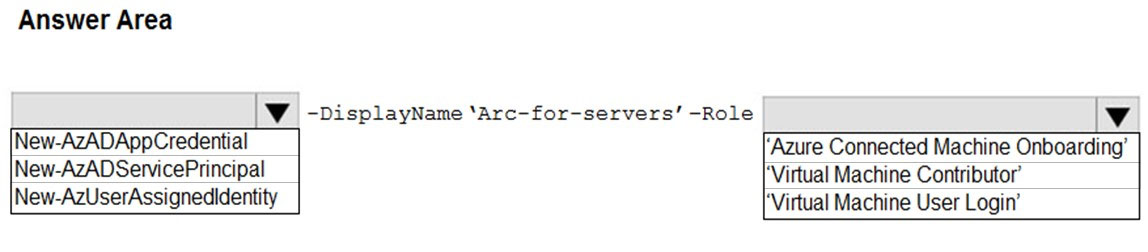
Suggested answer
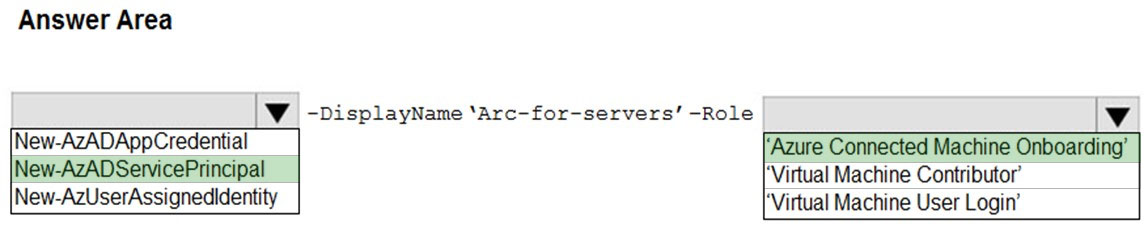
Correct answer
The suggested answer is correct
The Azure Arc service in the Azure portal provides a streamlined way to create a service principal that can be used to connect your hybrid machines to Azure.
- In the Azure portal, navigate to Azure Arc, then select Service principals in the left menu.
- Select Add.
- Enter a name for your service principal.
- Choose whether the service principal will have access to an entire subscription, or only to a specific resource group.
- Select the subscription (and resource group, if applicable) to which the service principal will have access.
- In the Client secret section, select the duration for which your generated client secret will be in use. You can optionally enter a friendly name of your choice in the Description field.
- In the Role assignment section, select Azure Connected Machine Onboarding.
- Select Create.
edykss
Highly Voted 2 years, 2 months ago
Answer is Correct
upvoted 11 times
leegend
Highly Voted 1 year, 5 months ago
Got this question 28-5-23
upvoted 5 times
boapaulo
Most Recent 11 months, 1 week ago
To create an identity that will be used by the script to authenticate access to the Azure subscription called sub1, following the principle of least privilege, you must use the New-AzADServicePrincipal command with the -Role parameter set to 'Azure Connected Machine Onboarding' This command creates a new service principal in Azure Active Directory and assigns it the role that only allows machines to be onboarded to Azure Arc, with no additional permissions to reonboard or delete the resource from the machine. The full command would be: New-AzADServicePrincipal -DisplayName 'Arc-for-servers' -Role 'Azure Connected Machine Onboarding' This command ensures that the identity created has only the permissions necessary to perform the task of onboarding the on-premises virtual machines to Azure Arc, without granting excessive privileges that could be improperly exploited.
upvoted 2 times
syu31svc
1 year, 7 months ago
Answer is correct and link given supports it
upvoted 4 times