
- 12 views
Overview
Contoso, Ltd. is a company that has a main office in Seattle and two branch offices in Los Angeles and Montreal.
Existing Environment
AD DS Environment
The network contains an on premises Active Directory Domain Services (AD DS) forest named contoso.com.
The forest contains two domains named contoso.com and canada.contoso.com.
The forest contains the domain controllers shown in the following table.
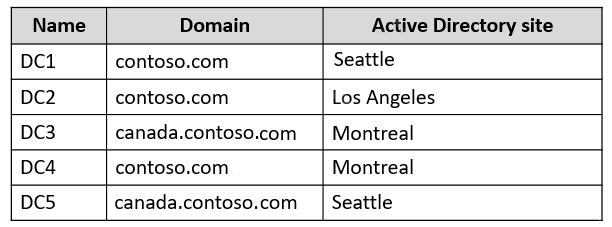
All the domain controllers are global catalog servers.
Server infrastructure
The network contains the servers shown in the following table.
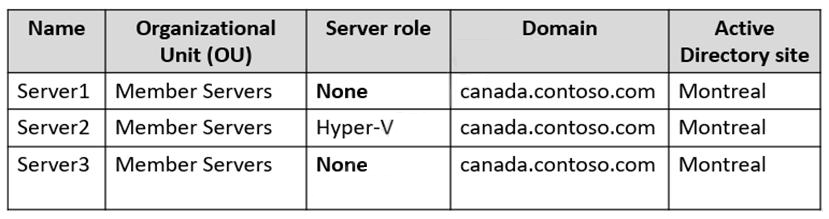
A server named Server4 runs Windows Server and is in a workgroup. Windows Firewall on Server4 uses the private profile.
Server2 hosts three virtual machines named VM1, VM2, and VM3.
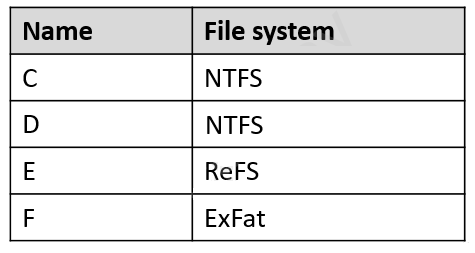
VM3 is a file server that stores data in the volumes shown in the following table.
Group Policies
The contoso.com domain has the Group Policies Objects (GPOs) shown in the following table.

Existing Identities
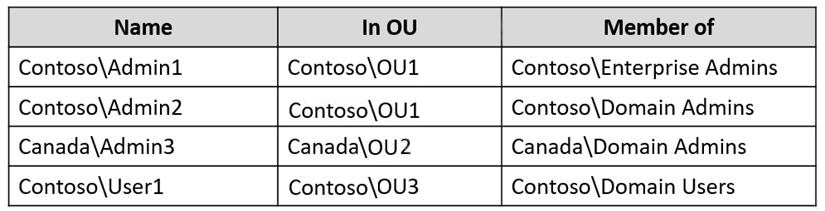
The forest contains the users shown in the following table.
The forest contains the groups shown in the following table.
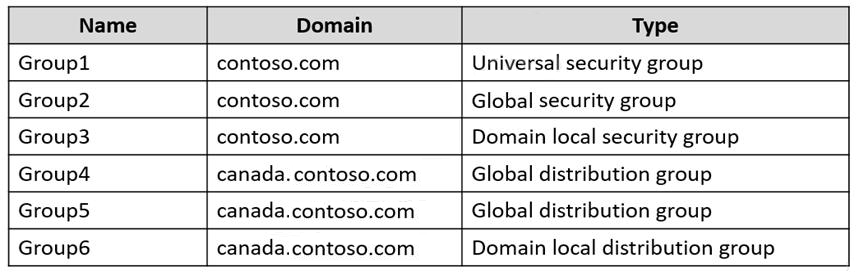
Current Problems
When an administrator signs in to the console of VM2 by using Virtual Machine Connection, and then disconnects from the session without signing out, another administrator can connect to the console session as the currently signed in user.
Requirements
Technical Requirements
Contoso identifies the following technical requirements:
- Change the replication schedule for all site links to 30 minutes.
- Promote Server1 to a domain controller in canada.contoso.com.
- Install and authorize Server3 as a DHCP server.
- Ensure that User1 can manage the membership of all the groups in Contoso\OU3.
- Ensure that you can manage Server4 from Server1 by using PowerShell remoting.
- Ensure that you can run virtual machines on VM1.
- Force users to provide credentials when they connect to VM2.
- On VM3, ensure that Data Deduplication on all volumes is possible.
You need to meet the technical requirements for VM2.
What should you do?
- A. Implement shielded virtual machines.
- B. Enable the Guest services integration service.
- C. Implement Credential Guard.
- D. Enable enhanced session mode.
- D. Enable enhanced session mode.
The suggested answer is correct
When an administrator signs in to the console of VM2 by using Virtual Machine Connection, this behaves like you connect to the physical console of a server.
If you Enable enhanced session mode, your connection will behave like usual RDP connection
bastien95
Highly Voted 2 years, 4 months ago
Selected Answer: D
The question is about preventing a VMConnect user from taking over another user's VMConnect session. - "Turn on enhanced session mode on Hyper-V host."
upvoted 13 times
rimvydukas
Highly Voted 2 years, 1 month ago
Selected Answer: D
Prevent a VMConnect user from taking over another user's VMConnect session Turn on enhanced session mode on Hyper-V host. Not having enhanced session mode turned on may pose a security and privacy risk. If a user is connected and logged on to a virtual machine through VMConnect and another authorized user connects to the same virtual machine, the session will be taken over by the second user and the first user will lose the session. The second user will be able to view the first user's desktop, documents, and applications.
https://learn.microsoft.com/en-us/windows-server/virtualization/hyper-v/learn-more/hyper-v-virtual-machine-connect
upvoted 5 times
Joedn
Most Recent 6 months ago
Valid 05/28/2024
upvoted 1 times
Kuikz
7 months, 2 weeks ago
Selected Answer: D
https://learn.microsoft.com/en-us/windows-server/virtualization/hyper-v/learn-more/hyper-v-virtual-machine-connect
upvoted 1 times
MR_Eliot
1 year, 2 months ago
Selected Answer: D
D is correcto
upvoted 1 times
oro_blu
1 year, 5 months ago
Selected Answer: C
https://www.examtopics.com/discussions/microsoft/view/75608-exam-az-800-topic-10-question-2-discussion/ When Windows Defender Credential Guard is enabled, NTLMv1, MS-CHAPv2, Digest, and CredSSP can't use the signed-in credentials.
upvoted 1 times
syu31svc
1 year, 8 months ago
Selected Answer: D
When an administrator signs in to the console of VM2 by using Virtual Machine Connection, and then disconnects from the session without signing out, another administrator can connect to the console session as the currently signed in user.
https://learn.microsoft.com/en-us/windows-server/virtualization/hyper-v/learn-more/hyper-v-virtual-machine-connect
Prevent a VMConnect user from taking over another user's VMConnect session Turn on enhanced session mode on Hyper-V host. Not having enhanced session mode turned on may pose a security and privacy risk. If a user is connected and logged on to a virtual machine through VMConnect and another authorized user connects to the same virtual machine, the session will be taken over by the second user and the first user will lose the session. The second user will be able to view the first user's desktop, documents, and applications. Answer is D
upvoted 2 times
empee1977
1 year, 9 months ago
Selected Answer: D
The best solution to meet the technical requirement for VM2 is to enable Enhanced Session Mode. Enhanced Session Mode allows the user to redirect local devices and resources, including credentials, from the client to the virtual machine.
upvoted 3 times
SJHCI
2 years, 4 months ago
Selected Answer: D
D: https://docs.microsoft.com/en-us/windows-server/virtualization/hyper-v/learn-more/hyper-v-virtual-machine-connect
upvoted 4 times
[Removed]
2 years, 4 months ago
Selected Answer: D
Current Problems - When an administrator signs in to the console of VM2 by using Virtual Machine Connection, and then disconnects from the session without signing out, another administrator can connect to the console session as the currently signed in user. Now add them together. = Enhanced Mode = D
upvoted 2 times
valgaw
2 years, 4 months ago
Selected Answer: C
When Windows Defender Credential Guard is enabled, NTLMv1, MS-CHAPv2, Digest, and CredSSP cannot use the signed-in credentials. Thus, single sign-on does not work with these protocols. However, applications can prompt for credentials or use credentials stored in the Windows Vault, which are not protected by Windows Defender Credential Guard with any of these protocols. It is recommended that valuable credentials, such as the sign-in credentials, are not to be used with any of these protocols. If these protocols must be used by domain or Azure AD users, secondary credentials should be provisioned for these use cases. When Windows Defender Credential Guard is enabled, Kerberos does not allow unconstrained Kerberos delegation or DES encryption, not only for signed-in credentials, but also prompted or saved credentials. https://docs.microsoft.com/en-us/windows/security/identity-protection/credential-guard/credential-guard-how-it-works
upvoted 3 times
AnonymousJhb
2 years, 4 months ago
No. dont read the Tech requirements in isolation. Remember the: Current Problems - When an administrator signs in to the console of VM2 by using Virtual Machine Connection, and then disconnects from the session without signing out, another administrator can connect to the console session as the currently signed in user. Now add them together. = Enhanced Mode = D
upvoted 3 times
HKEX388
2 years, 5 months ago
Answer is D. Tested in the environment, after enable the "Shielding" on the image, you cannot see the login screen in HyperV Virtual Machine connections. You need to enable "Enhanced-session-mode" and then you can see the login screen.
upvoted 2 times
AnonymousJhb
2 years, 4 months ago
it's not D. ESM is for enhanced Rdp functionality to a hyperv guest. https://docs.microsoft.com/en-us/virtualization/hyper-v-on-windows/user-guide/enhanced-session-mode
upvoted 2 times
AnonymousJhb
2 years, 4 months ago
I AM WRONG. THE ANSWER IS C! SORRY! "Prevent a VMConnect user from taking over another user's VMConnect session, Turn on enhanced session mode on Hyper-V host." as per: https://docs.microsoft.com/en-us/windows-server/virtualization/hyper-v/learn-more/hyper-v-virtual-machine-connect
upvoted 1 times
AnonymousJhb
2 years, 4 months ago
you cannot edit and it's 2am! the answer is DDD! as per above explanation.
upvoted 4 times
TheUltimateHac
2 years, 6 months ago
Selected Answer: C
Answer is C
upvoted 2 times
RJM
2 years, 6 months ago
Selected Answer: C
Question relates to passwords. Credential Guard is more fitting than enhanced session mode. https://docs.microsoft.com/en-us/windows/security/identity-protection/credential-guard/credential-guard-how-it-works
http://www.hypervrockstar.com/tag/enhanced-session-mode/
upvoted 2 times
AnonymousJhb
2 years, 4 months ago
no. Read the scenario. the question is about preventing a VMConnect user from taking over another user's VMConnect session. Turn on enhanced session mode on Hyper-V host."
upvoted 4 times