
Exam
Answer confirmed
Question
You have on-premises servers that run Windows Server as shown in the following table.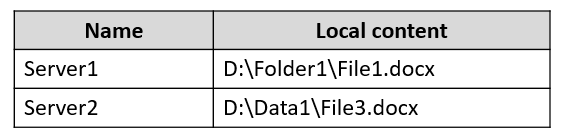
You have an Azure file share named share1 that stores two files named File2.docx and File3.docx.
You create an Azure File Sync sync group that includes the following endpoints:
✑ share1
✑ D:\Folder1 on Server1
✑ D:\Data1 on Server2
For each of the following statements, select Yes if the statement is true. Otherwise, select No.
NOTE: Each correct selection is worth one point.
Hot Area:
Proposed answer
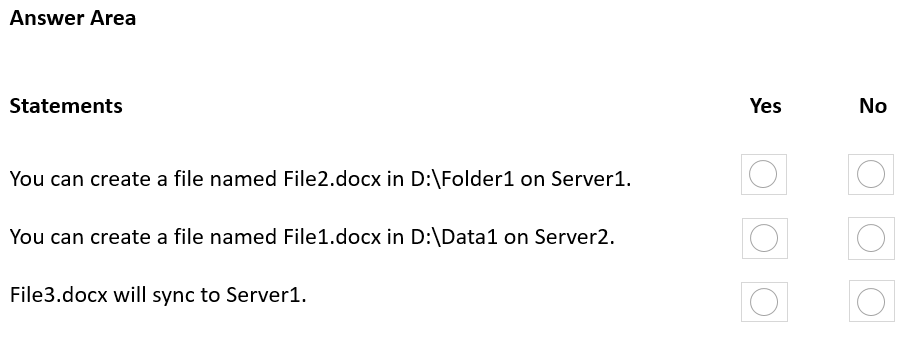
Suggested answer
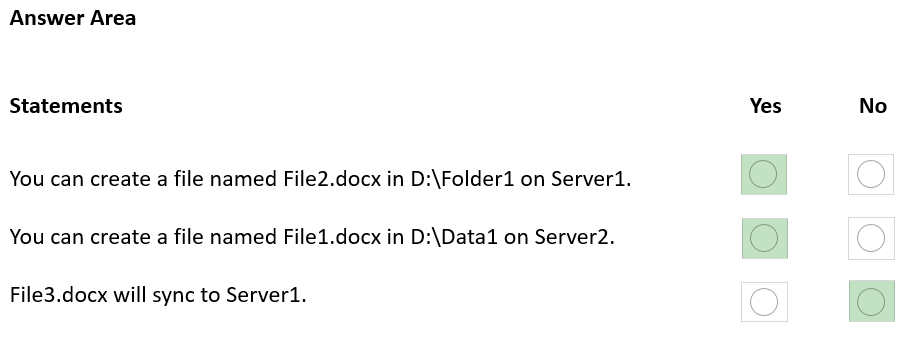
Correct answer
Suggested answer is incorrect
- N
- N
- Y
yayh
Highly Voted 2 years, 6 months ago
N,N,Y sync group will sync all data to all endpoints You can not create files same existing names
upvoted 28 times
GoforIT21
2 years, 4 months ago
Ok, true. But the question is about creating files on the servers that together make up the synced data. Would being joined to a sync group create limitations in what remains also a local folder? Is there a source to back this up?
upvoted 4 times
prepper666
Highly Voted 2 years, 5 months ago
NNY is the correct answer
upvoted 9 times
Ksk08
Most Recent 3 weeks ago
NNY is correct
upvoted 1 times
sardonique
3 months, 1 week ago
You cannot have 2 same files within the same folder, what about different folders? not sure about the answers in the comments. Azure file share stores its own files File2.docx and File3.docx in its root folder, whereas we've got subfolders within the onpremises servers. does Azure File Sync creates the folder hierarchy within its share?
upvoted 1 times
smorar
6 months ago
- You can create a file named File2.docx in D:\Folder1 on Server1: No (already exists due to synchronization) - You can create a file named File1.docx in D:\Data1 on Server2: Yes (does not exist, so it can be created) - File3.docx will sync to Server1: Yes (will sync from share1 to D:\Folder1 on Server1)
upvoted 2 times
smorar
6 months ago
I'm sorry. The correct answer is: You can create a file named File2.docx in D:\Folder1 on Server1: No (already exists due to synchronization) You can create a file named File1.docx in D:\Data1 on Server2: No (already exists due to synchronization) File3.docx will sync to Server1: Yes (will sync from share1 to D:\Folder1 on Server1)
upvoted 1 times
SIAMIANJI
6 months, 1 week ago
I did this in lab. N N Y
upvoted 2 times
syu31svc
1 year, 8 months ago
I would say Yes (No existing File2) No (Existing File1) Yes (For sure)
upvoted 5 times
Lu5ck
1 year, 11 months ago
NNY. I don't think you can create something that already exist. You can modify it though. I believe the trick here is "english".
upvoted 2 times
johosofat
2 years ago
I just went over this training and i belive #2 is Y - your not changing both files- your only changing 1 and it would simply overwrite the older copy. - https://learn.microsoft.com/en-us/training/modules/implement-hybrid-file-server-infrastructure/ Y Y (if we were modigying both then N but we are not) Y
upvoted 2 times
Kurko
2 years ago
1. N - You are not changing a file, it asks if you can create a file with a name that already exists on all endpoints as File2.docx has already been synced from Azure file share (share1) to on-premise endpoints 2. N - As I understand this is the same scenario. File1 from Server1 has already been synced to all endpoints when you try to create a new file with the same name. 3. Y - If you add an Azure file share that has an existing set of files as a cloud endpoint to a sync group, the existing files will sync to server endpoints that you add to the same sync group.
upvoted 3 times
Ciapek
2 years, 1 month ago
1. Yes -> You can :) 2. No -> "File Sync doesn't provide locking, which means that if the same file is modified on multiple endpoints at the same time before the first modification syncs, a conflict occurs." 3. Yes -> "File Sync implements multi-master replication, which means that changes that occur at any server endpoint sync to all other endpoints in the same sync group." (https://learn.microsoft.com/en-us/training/modules/implement-hybrid-file-server-infrastructure/5-describe-azure-file-synchronization) Please correct ,me if I am wrong
upvoted 5 times
lukiduc9625
2 years, 2 months ago
Should be: No, No, Yes - I tested it in real life. And I don't know why WMG and Vmwarevirtual has written about "share1 and Share" now I can find only first one in content of the question
upvoted 3 times
WMG
2 years, 3 months ago
Tricky, depends if "share1" and "Share" are supposed to be different or if it is just an error in the text.
upvoted 2 times
Vmwarevirtual
2 years, 6 months ago
1. Y 2. N 3. Y This question only deals with Azure file share - Share . The information with the Share 1 folder is puzzling you
upvoted 7 times