
- 1 view
Exam
Answer confirmed
Question
You have on-premises file servers that run Windows Server as shown in the following table.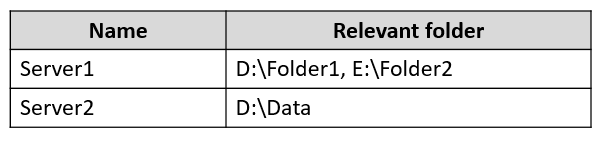
You have the Azure file shares shown in the following table.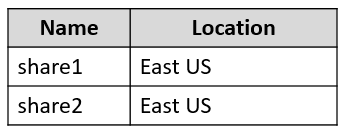
You add a Storage Sync Service named Sync1 and an Azure File Sync sync group named Group1. Group1 uses share1 as a cloud endpoint.
You register Server1 and Server2 with Sync1. You add D:\Folder1 from Server1 as a server endpoint in Group1.
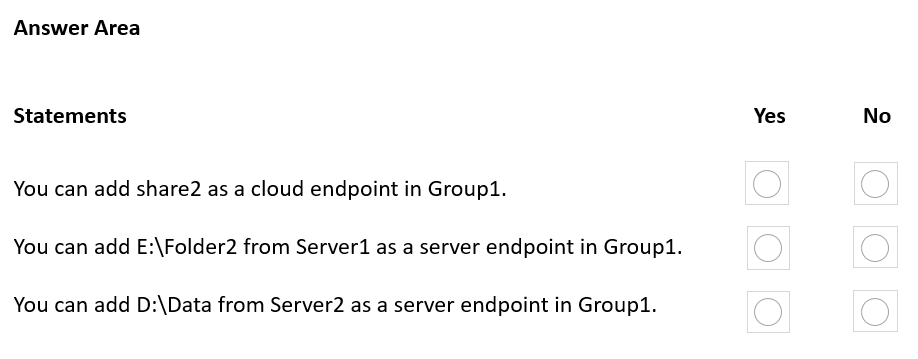
For each of the following statements, select Yes if the statement is true. Otherwise, select No.
NOTE: Each correct selection is worth one point.
Proposed answer
Suggested answer
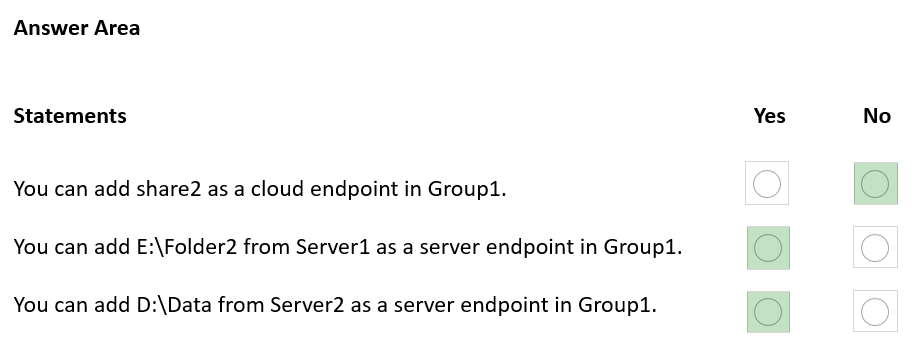
Correct answer
Suggested answer is incorrect
- You can add only one Cloud Endpoint within sync group
- within one sync group you can add only one server endpoint from the same server
- Adding a server endpoint from Server 2 is correct
--
- A server endpoint must be a path on a registered server (rather than a mounted share). Network attached storage (NAS) isn't supported.
- Although the server endpoint can be on the system volume, server endpoints on the system volume can't use cloud tiering.
- Changing the path or drive letter after you established a server endpoint on a volume isn't supported. Make sure you're using a suitable path before creating the server endpoint.
- A registered server can support multiple server endpoints, however, a sync group can only have one server endpoint per registered server at any given time. Other server endpoints within the sync group must be on different registered servers.
- Multiple server endpoints can exist on the same volume if their namespaces aren't overlapping (for example, F:\sync1 and F:\sync2) and each endpoint is syncing to a unique sync group.
prepper666
Highly Voted 2 years, 5 months ago
Correct answer is No, No, Yes
upvoted 31 times
Bojana
Highly Voted 2 years, 6 months ago
Box 1: No A sync group contains one cloud endpoint, or Azure file share, and at least one server endpoint. Box 2: No Azure File Sync does not support more than one server endpoint from the same server in the same Sync Group. Box 3: Yes Multiple server endpoints can exist on the same volume if their namespaces are not overlapping (for example, F:\sync1 and F:\sync2) and each endpoint is syncing to a unique sync group. Reference: https://docs.microsoft.com/en-us/answers/questions/110822/azure-file-sync-multiple-sync-directories-for-same.html https://docs.microsoft.com/en-us/azure/storage/files/storage-sync-files-deployment-guide
upvoted 23 times
Ksk08
Most Recent 3 weeks ago
Correct answer is NNY
upvoted 1 times
SIAMIANJI
6 months, 3 weeks ago
No No Yes
upvoted 1 times
Payday123
1 year ago
NNY "A registered server can support multiple server endpoints, however, a sync group can only have one server endpoint per registered server at any given time. Other server endpoints within the sync group must be on different registered servers. Multiple server endpoints can exist on the same volume if their namespaces are not overlapping (for example, F:\sync1 and F:\sync2) and each endpoint is syncing to a unique sync group." https://learn.microsoft.com/en-us/azure/storage/file-sync/file-sync-server-endpoint-create?tabs=azure-portal
upvoted 4 times
Payday123
1 year ago
NYY "Server endpoint: The path on the Windows Server that is being synced to an Azure file share. This can be a specific folder on a volume or the root of the volume. Multiple server endpoints can exist on the same volume if their namespaces do not overlap." https://learn.microsoft.com/en-us/azure/storage/file-sync/file-sync-planning
upvoted 1 times
NazerRazer
1 year, 1 month ago
it can be No, Yes, Yes. if we consider that reconfiguring the sync group is allowed. They statement isn't saying that we can't reconfigure the sync group. To summarize, the "No" responses for both statements are based on the specific configuration details provided, which indicate that Group1 is associated with "Share1" as its cloud endpoint and "D:\Folder1" from "Server1" as its server endpoint. This means that you cannot add different cloud endpoints (like "Share2") or different server endpoints (like "E:\Folder2") ----> to Group1 without reconfiguring the sync group. <----- its a microsoft question so you never know what they realy mean. Every one is Saying No,No,Yes but if its oke to reconfigure it than its a No, Yes, Yes.
upvoted 1 times
rknichols01
10 months, 2 weeks ago
but it is stating what to add, and it is not the volume.
upvoted 1 times
syu31svc
1 year, 8 months ago
https://learn.microsoft.com/en-us/answers/questions/110822/azure-file-sync-multiple-sync-directories-for-same Azure File Sync does not support more than one server endpoint from the same server in the same sync group https://learn.microsoft.com/en-us/azure/storage/file-sync/file-sync-deployment-guide?tabs=azure-portal%2Cproactive-portal A registered server can support multiple server endpoints, however a sync group can only have one server endpoint per registered server at any given time No No Yes
upvoted 5 times
sa66ath
1 year, 8 months ago
agree that answer is NNY
upvoted 1 times
wyindualizer
1 year, 10 months ago
A server endpoint represents a specific location on a registered Windows Server computer, such as a folder or a volume. You can add multiple server endpoints for the same Windows Server computer, but they must be in different sync groups. Server endpoints can be on the same volume of the same Windows Server computer if their namespaces don't overlap. For example, D:\Folder1 and D:\Folder2 can be two server endpoints on the same Windows Server computer. You can configure cloud tiering individually for each server endpoint Second = NO
upvoted 1 times
johosofat
2 years ago
Only 1 cloud endpoint per - sync group = no Q1 Can have multiple server endpoint per sync group but only one per server Q2 n Can have server endpoint from different server to same sync group Q3 Y
upvoted 2 times
Contactfornitish
2 years, 3 months ago
NO - One Endpoint one share NO - Multiple endpoint from same share not permitted as it would be same data at the end YES - Multiple endpoints from different servers can happen
upvoted 2 times
KevinKS87
2 years, 5 months ago
No No Yes
upvoted 5 times
CJCoolio
2 years, 6 months ago
Should be No Yes Yes You can only have ONE cloud endpoint and multiple server endpoints
upvoted 4 times
AvoKikinha
2 years, 6 months ago
Wrong NYY
upvoted 1 times
sloky
2 years ago
Wrong NNY
upvoted 1 times