
Exam
Answer confirmed
Question
Your network contains a two-domain on-premises Active Directory Domain Services (AD DS) forest named contoso.com. The forest contains the domain controllers shown in the following table.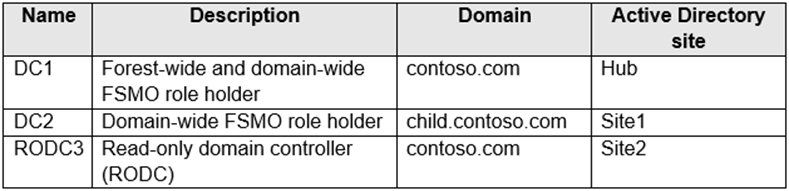
All domain controllers are backed up by using Azure Backup.
You create an Active Directory site named Site3. Site1, Site2, and Site3 each has a dedicated site link to the Hub site.
In Site3, you install a new server named Server1.
You need to promote Server1 to an RODC in child.contoso.com by using the Install from Media (IFM) option. The solution must minimize network traffic.
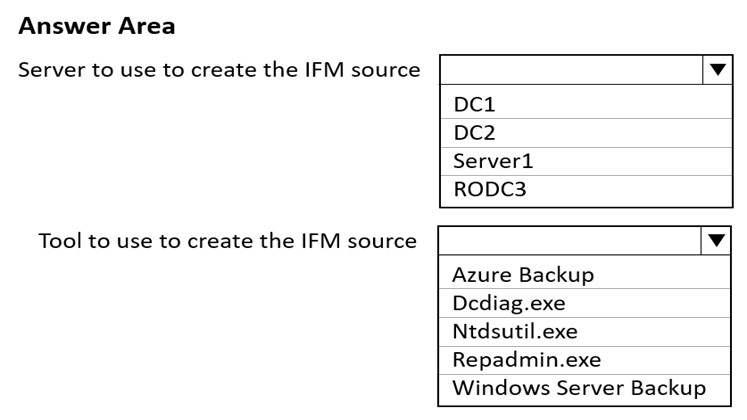
What should you do? To answer, select the appropriate options in the answer area.
NOTE: Each correct selection is worth one point.
Hot Area:
Proposed answer
Correct answer
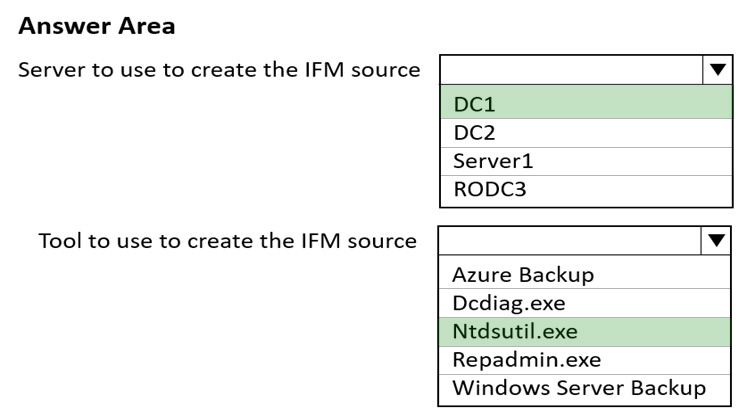
Screenshot is wrong:
- Server to use to create IFM source: DC2
- Tool to use to create the IFM source: ntdsutil.exe
xrisimix
Highly Voted 2 years, 2 months ago
DC2 is correct DC https://social.technet.microsoft.com/wiki/contents/articles/8630.active-directory-step-by-step-guide-to-install-an-additional-domain-controller-using-ifm.aspx
upvoted 15 times
johosofat
Highly Voted 2 years ago
DC2 and ntdsutil- https://www.windowstechno.com/deploy-domain-controller-using-install-from-media-ifm/
upvoted 11 times
formacaotismic
Most Recent 6 days, 9 hours ago
Server to use to create the IFM source: Use a domain controller in the child.contoso.com domain, preferably one that is geographically closest to Site3 to minimize network traffic. DC2 is in the child.contoso.com domain and is closest to Site3, use DC2. Tool to use to create the IFM source: Use Ntdsutil to create the IFM media. This tool allows you to create the necessary installation media for promoting a server to a domain controller.
upvoted 1 times
Ksk08
3 weeks ago
DC2 and NTDSUTIL
upvoted 1 times
Joedn
6 months ago
Valid 05/28/2024
upvoted 1 times
syu31svc
1 year, 8 months ago
"promote Server1 to an RODC in child.contoso.com" https://social.technet.microsoft.com/wiki/contents/articles/8630.active-directory-step-by-step-guide-to-install-an-additional-domain-controller-using-ifm.aspx To create installation media for a read-only domain controller (RODC), you can run the ntdsutil ifm command on either a writable domain controller DC2 to create source and run ntdsutil
upvoted 4 times
ant_12
1 year, 10 months ago
You create IFM by using Windows Azure Backup on DC2.
upvoted 2 times
JohnO1971
2 years, 1 month ago
DC2 not DC1
upvoted 4 times
[Removed]
2 years, 1 month ago
NTDSUTIL.exe is correct: https://social.technet.microsoft.com/wiki/contents/articles/8630.active-directory-step-by-step-guide-to-install-an-additional-domain-controller-using-ifm.aspx "Windows Server 2008 and Windows Server 2008 R2 include an improved version of the Ntdsutil tool that you can use to create installation media for an additional domain controller. You can use Ntdsutil.exe to create installation media for additional domain controllers that you are creating in a domain. The IFM method uses the data in the installation media to install AD DS, which eliminates the need to replicate every object from a partner domain controller."
upvoted 3 times
rimvydukas
2 years, 1 month ago
First oart of the answer is DC2. An excerpt from MS doc: The media that you use to create additional domain controllers must be taken from a domain controller in the same domain as the domain of the new domain controller.
upvoted 5 times
xrisimix
2 years, 2 months ago
The media that you use to create additional domain controllers must be taken from a domain controller in the same domain as the domain of the new domain controller.
upvoted 2 times