
You have an Active Directory domain that contains a file server named Server1. Server1 runs Windows Server and includes the file shares shown in the following table.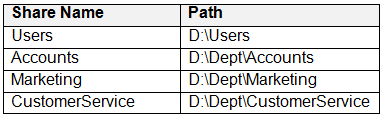
When users login to the network they receive the following network drive mappings.
• H: maps to \\server1\users\%UserName%
• G: maps to \\server1\%Department%
You need to limit the amount of space consumed by user’s on Server1. The solution must meet the following requirements:
• Prevent users using more than 5GB of space on their H: drive
• Prevent Accounts department users from using more than 10GB of space on the G: drive
• Prevent Marketing department users from using more than 15GB of space on the G: drive
• Prevent Customer Service department users from using more than 2GB of space on the G: drive
• Minimize administrative effort
What should you use?
- A. File Server Resource Manager (FSRM) quotas
- B. Storage tiering
- C. NTFS Disk quotas
- D. Group Policy Preferences
A. File Server Resource Manager (FSRM) quotas
The suggested answer is correct
- File Server Resource Manager (FSRM) is a role service in Windows Server that enables you to manage and classify data stored on file servers. You can use FSRM to automatically classify files, perform tasks based on these classifications, set quotas on folders, and create reports monitoring storage usage. In Windows Server version 1803, FSRM adds the ability to prevent the creation of change journals.
- Storage Tiers allow for use of SSD and hard drive storage within the same storage pool as a new feature in Windows Server 2012 R2.
- The NTFS file system supports disk quotas, which allow administrators to control the amount of data that each user can store on an NTFS file system volume. Administrators can optionally configure the system to log an event when users are near their quota, and to deny further disk space to users who exceed their quota. Administrators can also generate reports, and use the event monitor to track quota issues.
- Group Policy Preferences is a collection of Group Policy client-side extensions that deliver preference settings to domain-joined computers running Microsoft Windows desktop and server operating systems. Preference settings are administrative configuration choices deployed to desktops and servers. Preference settings differ from policy settings because users have a choice to alter the administrative configuration. Policy settings administratively enforce setting, which restricts user choice.
NazerRazer
1 year ago
Selected Answer: A
To limit the amount of space consumed by users on Server1 with the specified requirements, you should use File Server Resource Manager (FSRM) quotas. FSRM allows you to set space limits on shared resources and provides more granular control over storage consumption. In this case, you can set FSRM quotas for the H: and G: drives based on the user's department and the specific space limits you need to enforce. So, the correct answer is: A. File Server Resource Manager (FSRM) quotas
upvoted 2 times
skycrap
1 year, 5 months ago
Selected Answer: A
Correct: https://learn.microsoft.com/en-us/windows-server/storage/fsrm/quota-management