
- 3 views
Exam
Answer needs confirmation
Question
You have an Azure subscription. The subscription contains a virtual machine named VM1 that runs Windows Server. The subscription contains the storage accounts shown in the following table.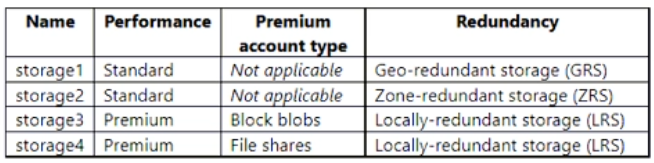
You plan to enable boot diagnostics for VM1.
You need to configure storage for the boot diagnostics logs and snapshots.
Which storage account should you use?
Proposed answer
- A. storage1
- B. storage2
- C. storage3
- D. storage4
Suggested answer
A. storage1
watson_n
Highly Voted 2 years ago
Should be A, Boot diagnostics doesn't support premium storage accounts or zone redundant storage accounts. If either of these are used for boot diagnostics users will receive an StorageAccountTypeNotSupported error when starting the VM.
upvoted 24 times
jecawi9630
Highly Voted 2 years ago
Selected Answer: B
Standard type is required. Can either be Standard LRS or Standard ZRS. https://learn.microsoft.com/en-us/azure/virtual-machines/boot-diagnostics#boot-diagnostics-storage-account
upvoted 10 times
wyindualizer
1 year, 11 months ago
no...Boot diagnostics doesn't support premium storage accounts or zone redundant storage accounts. If either of these are used for boot diagnostics users will receive an StorageAccountTypeNotSupported error when starting the VM.
upvoted 3 times
BJack
1 year, 11 months ago
B. The link provided states "Because the managed accounts are created on either Standard LRS or Standard ZRS, customers will be charged at $0.05/GB per month for the size of their diagnostic data blobs only".
upvoted 2 times
BJack
1 year, 11 months ago
I stand corrected. I just labbed this and was unable to use ZRS but I was able to use GRS so the Answer is B.
upvoted 3 times
Tiago_MP
1 year, 5 months ago
You correction doesn't make any sense, you were unable to use ZRS but you choosed B? B is ZRS!
upvoted 3 times
mxcasarini
Most Recent 5 months ago
Selected Answer: A
The Boot diagnostics feature does not support premium storage account or Zone Redundant Storage Account Types. If you use the premium storage account for Boot diagnostics, you might receive the StorageAccountTypeNotSupported error when you start the VM.
upvoted 1 times
nap61
5 months, 4 weeks ago
Selected Answer: A
https://learn.microsoft.com/en-us/troubleshoot/azure/virtual-machines/windows/boot-diagnostics Note The Boot diagnostics feature does not support premium storage account or Zone Redundant Storage Account Types. If you use the premium storage account for Boot diagnostics, you might receive the StorageAccountTypeNotSupported error when you start the VM. So, A - storage1
upvoted 1 times
RemmyT
6 months ago
Selected Answer: A
Answer: A (storage1) Account kind : StorageV2 (general purpose v2) Replication : Read-access geo-redundant storage (RA-GRS) Tested in lab. Failed to add a Standard StorageV2, Zone-redundant storage (ZRS)
upvoted 1 times
smorar
8 months ago
Selected Answer: A
A. Storage1 The Boot diagnostics feature does not support premium storage account or Zone Redundant Storage Account Types. https://learn.microsoft.com/en-us/troubleshoot/azure/virtual-machines/windows/boot-diagnostics
upvoted 1 times
ahenriquez02
8 months, 2 weeks ago
Correct answer is A Boot diagnostics doesn't support premium storage accounts or zone redundant storage
upvoted 1 times
elizarov
8 months, 2 weeks ago
A that's correct. Boot diagnostics does not support premium storage accounts or zone-redundant storage accounts. You should use a standard storage account that is either a General-purpose v1 (GPv1) or General-purpose v2 (GPv2) for boot diagnostics. Here is the summary of the types of storage accounts you should use: Standard General-purpose v2 (GPv2): Recommended for most scenarios, including boot diagnostics. Standard General-purpose v1 (GPv1): Also supports boot diagnostics, but it is less common to use compared to GPv2. Premium and zone-redundant storage accounts are not supported for boot diagnostics. Therefore, make sure to choose a standard storage account.
upvoted 1 times
004b54b
9 months ago
Selected Answer: A
https://learn.microsoft.com/en-us/azure/virtual-machines/boot-diagnostics#limitations Boot diagnostics doesn't support premium storage accounts or zone redundant storage accounts.
upvoted 1 times
SanMan_NZ
11 months ago
Selected Answer: A
Multiple MS documents have the following Statements: "" Important Boot diagnostics doesn't support premium storage accounts or zone-redundant storage accounts. When either premium or zone-redundant storage accounts are used for boot diagnostics, users receive a StorageAccountTypeNotSupported error upon starting their virtual machine (VM)."" Therefore A (Storage1) is the only possible option left.
upvoted 1 times
Neeraj1978
11 months, 3 weeks ago
Boot diagnostics doesn't support premium storage accounts or zone redundant storage accounts. If either of these are used for boot diagnostics users receive an StorageAccountTypeNotSupported error when starting the VM. https://learn.microsoft.com/en-us/azure/virtual-machines/boot-diagnostics
upvoted 1 times
ki01
11 months, 3 weeks ago
Selected Answer: A
watson_n, jecawi9630 posted already.
upvoted 1 times
boapaulo
1 year, 1 month ago
Should be A, The Azure Startup Diagnostics feature requires a standard storage account. Premium storage accounts (such as storage3 and storage4) are not supported. In addition, zone redundancy (as in storage2) is also not supported for boot diagnostics. Therefore, storage1, which is a standard storage account with geo-redundant storage (GRS), is the most suitable option for storing the boot diagnostic logs and snapshots.
upvoted 1 times
Tiago_MP
1 year, 5 months ago
Selected Answer: A
Based on this: https://learn.microsoft.com/en-us/troubleshoot/azure/virtual-machines/boot-diagnostics he Boot diagnostics feature does not support premium storage account or Zone Redundant Storage Account Types. If you use the premium storage account for Boot diagnostics, you might receive the StorageAccountTypeNotSupported error when you start the VM. Even documented in GitHub: https://github.com/MicrosoftDocs/azure-docs/issues/63225 It has to be A!
upvoted 2 times
calotta1
1 year, 6 months ago
Has to be B as per link provided. I also wouldn't want to use GEO replication storage for logs.
upvoted 2 times
skycrap
1 year, 7 months ago
Selected Answer: A
A is correct: https://learn.microsoft.com/en-us/azure/virtual-machines/boot-diagnostics#boot-diagnostics-storage-account:~:text=Boot%20diagnostics%20doesn%27t%20support%20premium%20storage%20accounts%20or%20zone%20redundant%20storage%20accounts.%20If%20either%20of%20these%20are%20used%20for%20boot%20diagnostics%20users%20receive%20an%20StorageAccountTypeNotSupported%20error%20when%20starting%20the%20VM.
upvoted 2 times
Tylosh
1 year, 7 months ago
Selected Answer: A
I don't need to explain again jecawi9630 already provided the supporting link.
upvoted 1 times
phi3nix
1 year, 7 months ago
Limitations: Boot diagnostics doesn't support premium storage accounts or zone redundant storage accounts. If either of these are used for boot diagnostics users receive an StorageAccountTypeNotSupported error when starting the VM It can't be C and D because the premium is not supported. It can't be B because Zone-redundant storage is not supported. It is A. Link: https://learn.microsoft.com/en-us/azure/storage/common/storage-redundancy#redundancy-in-the-primary-region
upvoted 1 times
arnitjoe
1 year, 8 months ago
Selected Answer: A
https://learn.microsoft.com/en-us/troubleshoot/azure/virtual-machines/boot-diagnostics "The Boot diagnostics feature does not support premium storage account or Zone Redundant Storage Account Types. If you use the premium storage account for Boot diagnostics, you might receive the StorageAccountTypeNotSupported error when you start the VM."
upvoted 2 times
jbreu
1 year, 8 months ago
Selected Answer: A
https://learn.microsoft.com/en-us/azure/virtual-machines/boot-diagnostics#limitations "Boot diagnostics doesn't support premium storage accounts or zone redundant storage accounts. If either of these are used for boot diagnostics users receive an StorageAccountTypeNotSupported error when starting the VM."
upvoted 2 times
raulgar
1 year, 9 months ago
Selected Answer: B
It's B, for boot diagnostics the stage account must be standard (LRS or Zrs) https://learn.microsoft.com/en-us/azure/virtual-machines/boot-diagnostics
upvoted 1 times
raulgar
1 year, 9 months ago
******************* Because the managed accounts are created on either Standard LRS or Standard ZRS, customers will be charged at $0.05/GB per month for the size of their diagnostic data blobs only. **************
upvoted 1 times
syu31svc
1 year, 9 months ago
Selected Answer: A
Taking A as the answer https://learn.microsoft.com/en-us/troubleshoot/azure/virtual-machines/boot-diagnostics The Boot diagnostics feature does not support premium storage account or Zone Redundant Storage Account Types. If you use the premium storage account for Boot diagnostics, you might receive the StorageAccountTypeNotSupported error when you start the VM.
upvoted 3 times
SJHCI
1 year, 10 months ago
Selected Answer: A
the correct answer is A) Pleasem read documentation before answer to question: https://learn.microsoft.com/en-us/azure/virtual-machines/boot-diagnostics#limitations
upvoted 4 times
raulgar
1 year, 8 months ago
read the link please, "Because the managed accounts are created on either Standard LRS or Standard ZRS"
upvoted 1 times
AliRi
1 year, 9 months ago
Correct. "Boot diagnostics doesn't support premium storage accounts or zone redundant storage accounts."
upvoted 2 times
prepper666
1 year, 10 months ago
The correct answer is A, GRS. You cannot use ZRS, VM will not start correctly.
upvoted 2 times
aky_no
1 year, 10 months ago
Selected Answer: B
Boot Diagnostic can use managed accounts, They are created on either Standard LRS or Standard ZRS . Standard ZRS = Answer B https://learn.microsoft.com/en-us/azure/virtual-machines/boot-diagnostics#boot-diagnostics-storage-accountThe boot diagnostics data blobs (which comprise of logs and snapshot images) are stored in a managed storage account. Customers will be charged only on used GiBs by the blobs, not on the disk's provisioned size. The snapshot meters will be used for billing of the managed storage account. Because the managed accounts are created on either Standard LRS or Standard ZRS, customers will be charged at $0.05/GB per month for the size of their diagnostic data blobs only. For more information on this pricing, see Managed disks pricing. Customers see this charge tied to their VM resource URI.
upvoted 2 times
BurtSmart
1 year, 10 months ago
https://learn.microsoft.com/en-us/azure/virtual-machines/boot-diagnostics
upvoted 2 times
kijken
1 year, 10 months ago
Selected Answer: A
GRS ZRS not supported, will break boot diagnostics
upvoted 2 times
Goofer
1 year, 11 months ago
Selected Answer: A
Boot diagnostics doesn't support premium storage accounts (C and D, are not possible) Boot diagnostics doesn't zone redundant storage accounts (B is not possible) Answer is A
upvoted 4 times
ant_12
1 year, 12 months ago
Answer is A. Standard GRS.
upvoted 4 times
DavisXander
2 years ago
Selected Answer: B
Answer is B. Standard type is a must , plus LRS / ZRS
upvoted 3 times
wyindualizer
1 year, 11 months ago
no... Boot diagnostics doesn't support premium storage accounts or zone redundant storage accounts. If either of these are used for boot diagnostics users will receive an StorageAccountTypeNotSupported error when starting the VM.
upvoted 2 times