
Exam
Answer confirmed
Question
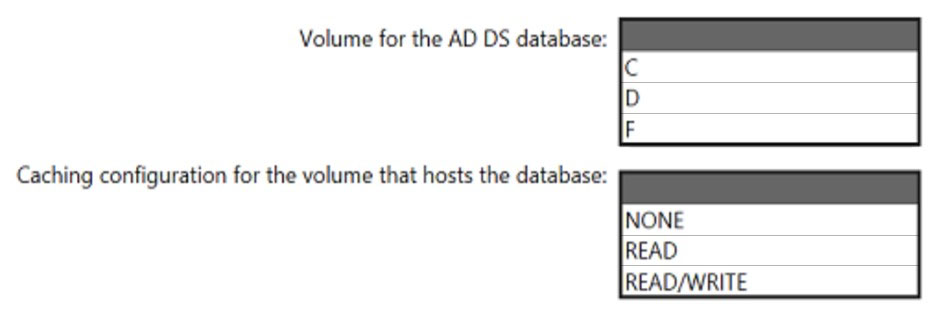
You plan to deploy an Azure virtual machine that will run Windows Server. The virtual machine will host an Active Directory Domain Services (AD DS) domain controller and a drive named F: on a new virtual disk.
You need to configure storage for the virtual machine. The solution must meet the following requirements:
* Maximize resiliency for AD DS.
* Prevent accidental data loss.
How should you configure the storage? To answer, select the appropriate options in the answer area.
NOTE: Each correct selection is worth one point.
Proposed answer
Correct answer
Suggested Answer: 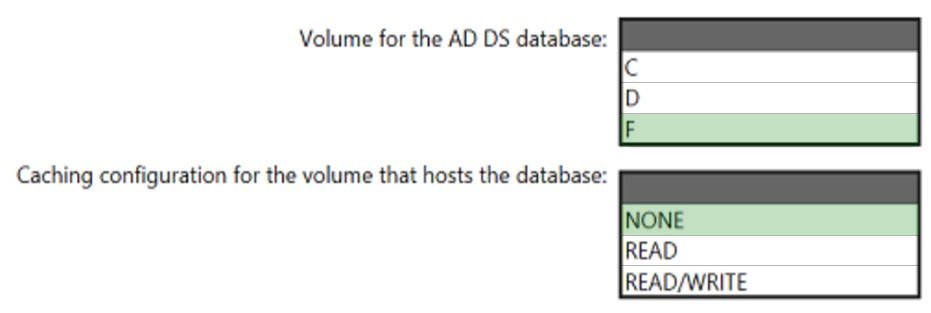
Box 1: F -
Create a separate virtual data disk for storing the database, logs, and sysvol folder for Active Directory. Do not store these items on the same disk as the operating system.
Box 2: None -
By default, data disks that are attached to a VM use write-through caching. However, this form of caching can conflict with the requirements of AD DS. For this reason, set the Host Cache Preference setting on the data disk to None.
Reference:
https://docs.microsoft.com/en-us/azure/architecture/reference-architectures/identity/adds-extend-domain
Box 1: F -
Create a separate virtual data disk for storing the database, logs, and sysvol folder for Active Directory. Do not store these items on the same disk as the operating system.
Box 2: None -
By default, data disks that are attached to a VM use write-through caching. However, this form of caching can conflict with the requirements of AD DS. For this reason, set the Host Cache Preference setting on the data disk to None.
Reference:
https://docs.microsoft.com/en-us/azure/architecture/reference-architectures/identity/adds-extend-domain
Lu5ck
Highly Voted 1 year, 11 months ago
Correct. https://learn.microsoft.com/en-us/windows-server/administration/performance-tuning/role/active-directory-server/hardware-considerations
upvoted 8 times
Ksk08
Most Recent 4 weeks ago
the answer is correct
upvoted 1 times
SIAMIANJI
6 months, 2 weeks ago
The answer is correct: Create a separate virtual data disk for storing the database, logs, and sysvol folder for Active Directory. Don't store these items on the same disk as the operating system. By default, data disks are attached to a VM using write-through caching. However, this form of caching can conflict with the requirements of AD DS. For this reason, set the Host Cache Preference setting on the data disk to None.
upvoted 2 times
lucacose
11 months, 3 weeks ago
F: and none By default, data disks are attached to a VM using write-through caching. However, this form of caching can conflict with the requirements of AD DS. For this reason, set the Host Cache Preference setting on the data disk to None. https://learn.microsoft.com/en-us/azure/architecture/example-scenario/identity/adds-extend-domain
upvoted 3 times
Bolo92
11 months, 4 weeks ago
valid 27.11.23
upvoted 2 times
leegend
1 year, 5 months ago
Got this question 28-5-23
upvoted 3 times
syu31svc
1 year, 8 months ago
Answer is correct and link provided supports it
upvoted 3 times