
Exam
Answer confirmed
Question
Your network contains an Active Directory Domain Services (AD DS) domain named adatum.com. The domain contains a file server named Server1 and three users named User1, User2, and User3.
Server1 contains a shared folder named Share1 that has the following configurations: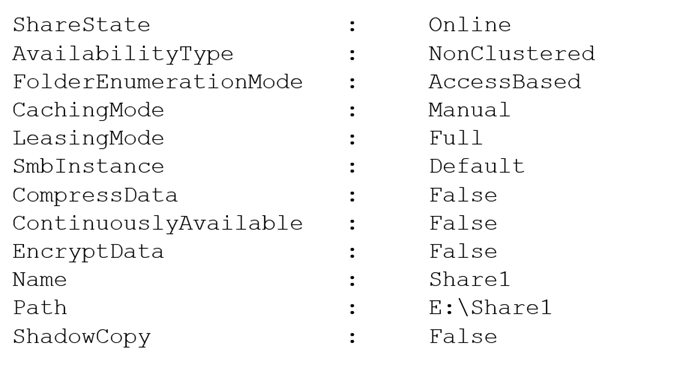
The share permissions for Share1 are configured as shown in the Share Permissions exhibit.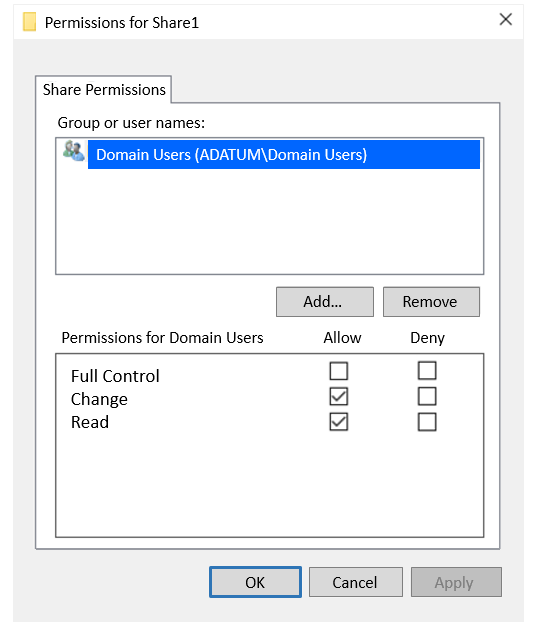
Share1 contains a file named File1.txt. The advanced security settings for File1.txt are configured as shown in the File Permissions exhibit.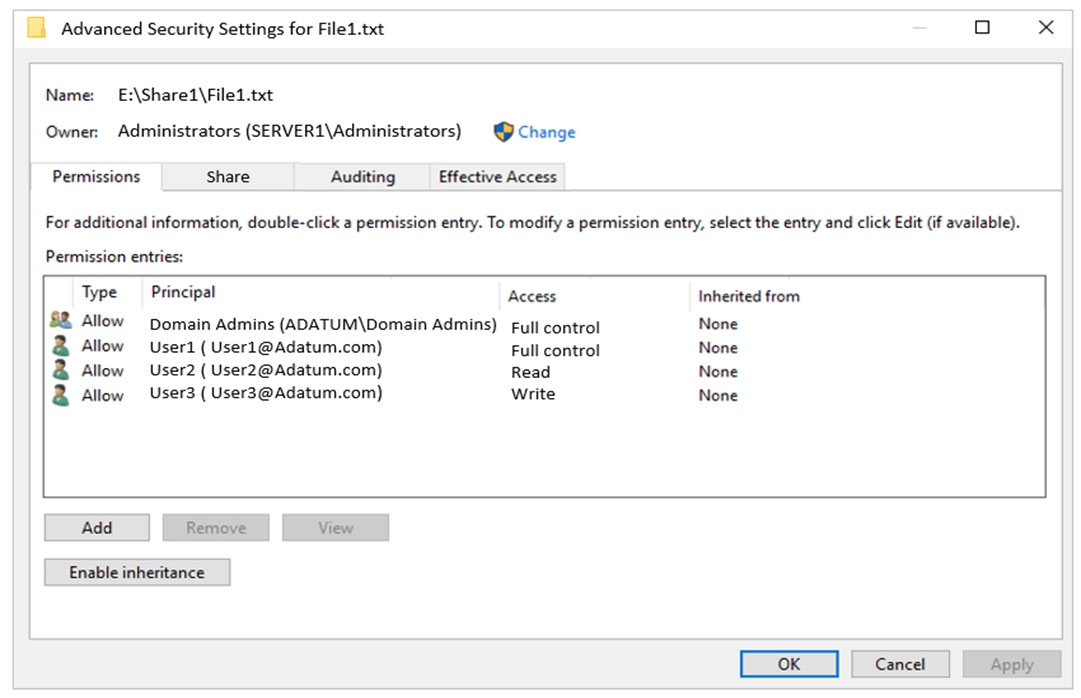
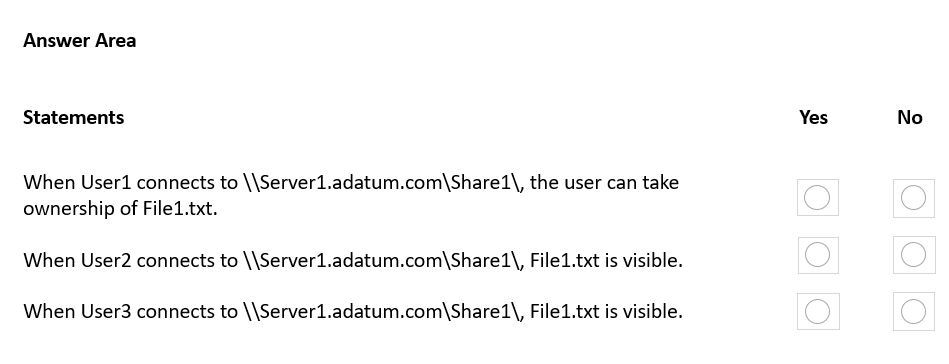
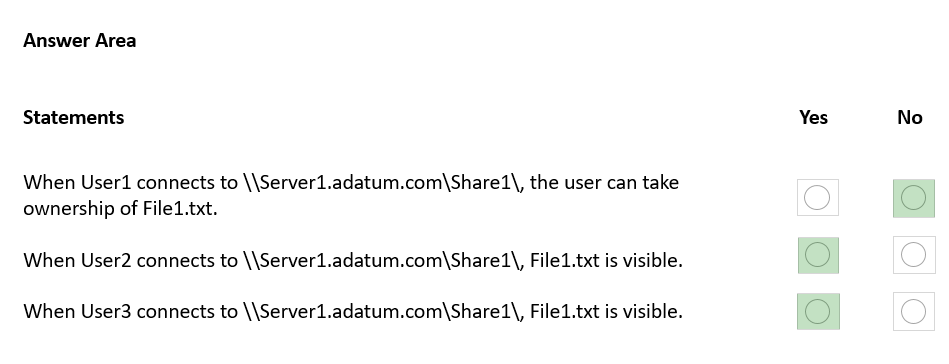
For each of the following statements, select Yes if the statement is true. Otherwise, select No.
NOTE: Each correct selection is worth one point.
Hot Area:
Proposed answer
Suggested answer
Correct answer
The suggested answer is incorrect
- No. Share permission for user1 does not allow take ownership or change permissions (for this Full Control share permission needed)
- Yes. For User2 File1 will be visible
- No. AccessBasedEnumeration prevents viewing files and folders not have access. in this situation user 3 have access to write? but not read
https://www.varonis.com/blog/ntfs-permissions-vs-share
prepper666
Highly Voted 2 years, 5 months ago
WOW, read the question!!!! Box 1: No. User 1 share permission in Change (domain users), NTFS = Full Control, most restrictive applies when combining permissions Box 2: Yes. User 2 has Read NTFS and Change (share) Read wins Box 3: Yes. User 3 has Write NTFS and Change (share) Write wins
upvoted 26 times
lukiduc9625
2 years, 2 months ago
Box 3 should be No - when you configure FolderEnumerationMode to AccessBased only account who has Read specific permission to certain file/folder will see this file/folder. AccessBased Enumeration isn't enabled in default configuration, but in question there is screenshot which shows that it is enabled in our case.
upvoted 8 times
Leocan
2 years ago
user3 has "write" access. Specifies which files and folders in the new SMB share will be visible to the users. The acceptable values for this parameter are: AccessBased. SMB does not the display the files and folders for a share to a user unless that user has rights to access the files and folders. By default, access-based enumeration is disabled for new SMB shares. Unrestricted. SMB displays files and folders to a user even when the user does not have permission to access those items.
upvoted 1 times
AvoKikinha
Highly Voted 2 years, 6 months ago
Wrong, NYY
upvoted 24 times
knotcz
9 months, 1 week ago
Incorrect. Last one is NO. User doesn't have read permission so he cannot see file. Everyone can test it on their own Windows machine. It is simple. Fist I was confused too. But after 10min testing it was clear.
upvoted 1 times
nazgul250
2 years, 6 months ago
Why? User1 have fullcontrol in the file.
upvoted 2 times
AnonymousJhb
2 years, 4 months ago
NTFS only applies when u logon to the server locally = eg U1 has FC. all 3 questions refers to remote unc connections which means the share permissions dominate which means all 3 users have read and write so u 1 cannot take ownership via unc.
upvoted 4 times
EdshotMachine
1 year, 10 months ago
Share + NTFS = Most Restrictive (Which in this case Share permission wins)
upvoted 3 times
Kurko
2 years ago
Wrong. How can this be highly voted? It's N Y N as lukiduc9625 and joehoesofat said. The last one is N - write permissions on file are more restrictive than Change+Read on Share1 and write wins over Change+Read. FolderEnumerationMode set to AccessBased will result in showing files/folders which have Read or equivalent permissions - write is not enough. It just has to be Read or it will not show up in the folder.
upvoted 17 times
jecawi9630
1 year, 11 months ago
N Y N Like Kurko said, AccessBasedEnumeration is the key. For that reason, User3 can not see the file1.txt.
upvoted 9 times
jecawi9630
1 year, 11 months ago
On another though... The permissions shown here are not for the folder. It is for the actual file file1.txt. Meaning, if User3 has write permissions, it must mean User3 saved that file and still has permissions to see that file exists. User3 might be able to overwrite, but not edit or delete. https://community.spiceworks.com/topic/832081-write-only-shared-folder-permissions-in-education-setting#:~:text=Creator%20Owner%20has%3A%20List%20folder%2Fread%20data%2C%20read%20attrib%2C,saved%20to%20make%20sure%20it%20was%20copied%20successfully. (Students have to save the file first on their computer they copy and paste the file into the correct dropbox folder. They can not save directly to the folder. Students can View their own files they have dropped into this folder and can overwrite them, but they can not delete them. )
upvoted 1 times
formacaotismic
Most Recent 5 days, 16 hours ago
NTFS permissions apply when accessing the file system locally or through a network share. However, when accessing files via a UNC path, both share and NTFS permissions are evaluated, and the most restrictive permission set applies. For remote UNC connections: Visibility: All three users (user1, user2, and user3) will see the file because the share permissions allow read and write access. Take Ownership: user1 cannot take ownership via UNC because the share permissions do not grant full control, which is required to take ownership.
upvoted 1 times
RickySmith
11 months ago
YYY 1) User 1 has direct non-inherited Full Control rights (same as the highest level admin), so they can take ownership. 2) User 2 has read rights on the folder. List folder is part of those rights, so they can see the file. 3) User 3 has read rights on the folder. List folder is part of those rights, so they can see the file.
upvoted 4 times
boapaulo
11 months, 1 week ago
Let's analyze each of the statements: When User1 connects to \Server1.adatum.com\Share1), the user can take ownership of File1.txt. Yes, User1 can take ownership of File1.txt. This is because User1 has full control, which includes the permission to take ownership of a file. When User2 connects to \Server1.adatum.com\Share1), File1.txt is visible. Yes, File1.txt will be visible to User2. User2 has “Change” permission, which includes permission to read files. When User3 connects to \Server1.adatum.com\Share1, File1.txt is visible. Yes, File1.txt will be visible to User3. User3 has “Change” permission, which includes permission to read files.
upvoted 2 times
Payday123
1 year ago
NYN You guys are confuse WRITE permission with MODIFY MODIFY implies READ WRITE doesn't imply READ - can be a separate permission without READ Screenshot shows WRITE permission and NOT READ so the file is not visible
upvoted 3 times
Payday123
1 year ago
Any Object (File / Folder / Shortcut / Reparse Point / etc.) where the user has less than generic read permissions is omitted in the response by the server. Generic Read means: List Folder / Read Data Read Attributes Read Extended Attributes Read Permissions
upvoted 1 times
JackBauer
1 year, 1 month ago
Test it for yourself in your labs. User3 cannot see it. Write doesn't give you "Read" permissions. You need to explicitly tick "Read" (and also "Write") if you want User3 to be able to write to the file. Answer is: N
upvoted 3 times
MR_Eliot
1 year, 2 months ago
1. NO, you will also need full share access to change the ownership. [tested] 2. YES, user has read permissions. [tested] 3. NO, user only has write permissions, therefore cannot read the file. [tested]
upvoted 7 times
knotcz
9 months, 1 week ago
I have tested it also and received the same resolute.
upvoted 1 times
THEHob0
9 months ago
agreed - took 5-10 mins to test for myself.
upvoted 1 times
afridi43
1 year, 2 months ago
Correct NO. YES. YES. (reason below) - Usee3 has NTFS Write permission on File1.txt. - SHARE1 is a shared folder with Domain users having CHANGE allow permissions. which includes the ability to view files and folders within the share. - FolderEnumerationMode is set to AccessBased, which means that file and folder visibility is determined based on the user's NTFS permissions. So, in summary, User1 will be able to see and access File1.txt when connecting to \SERVER1\SHARE1\ due to their NTFS Write permission and the share-level CHANGE permissions granted to Domain users.
upvoted 2 times
Doman01
1 year, 3 months ago
In an NTFS file share where the FolderEnumerationMode is set to "AccessBased," users who have access to a folder (or share) can see the items within that folder based on their effective permissions. This means that users will only see files and folders for which they have at least the "List Folder Contents" permission. In your scenario, User3 has only WRITE permission on the file "file1.txt." Since WRITE permission does not include the "List Folder Contents" permission, User3 would not be able to see the file "file1.txt" in the share, even though they have write access to that specific file. They would not have the necessary permission to enumerate the contents of the folder that contains "file1.txt," so the file would be effectively hidden from User3 when they browse the share. To summarize, with the settings you described, User3 would not be able to see the file "file1.txt" in the share. They can only modify the file since they have WRITE permission directly on that file, but they don't have the necessary permissions to list the contents of the folder that contains the file.
upvoted 1 times
louis04225
1 year, 6 months ago
Good : N,Y,Y https://www.varonis.com/blog/ntfs-permissions-vs-share
upvoted 1 times
MiMojo
1 year, 7 months ago
#3 is definitely NO. I just tested this out as described. The key is the FolderEnumerationMode. Write permissions isn't enough to see the file over the network. User3 would also need to have READ permissions.
upvoted 2 times
syu31svc
1 year, 8 months ago
https://www.ntfs.com/ntfs-permissions-ownership.htm#:~:text=You%20must%20have%20Full%20Control,to%20any%20user%20or%20group. You must have Full Control or the special permissions "Take Ownership" to be able to take ownership of a file or folder. I would say Yes to all
upvoted 2 times
syu31svc
1 year, 7 months ago
Disregard this; answer is No Yes Yes Credit to prepper666 for the explanation
upvoted 2 times
chadamantium
1 year, 9 months ago
Reproduced in Lab - It's N Y N
upvoted 4 times
phi3nix
1 year, 6 months ago
I also reproduced it in LAB and @chadamantium is right. User1 can't take ownership (can see file). User2 can see the file. User3 can't see the file. When you enable access-based enumeration is written. “Access-based enumeration displays only the files and folders that a user has permissions to access. If a user does not have Read (or equivalent) permissions for a folder, Windows hides the folder from the user’s view. "
upvoted 1 times
wredski
1 year, 10 months ago
I just tested this in a lab, and it seems that it's YYN. User1 - Sees the txt file and is able to open the txt file, make changes, and save them. User2 - Sees the txt file and is able to open the txt file, but cannot save any changes (when you try and save, the "save as" prompt comes up User3 - when navigating to that share, they cannot see that file Pretty quick and easy to recreate. Not sure if anyone else has tested this but this is correct in my lab setting.
upvoted 3 times
joehoesofat
2 years ago
Box1: no- has change but not full controll cannot take ownership Box2: yes Box 3:no - Has write but not read- Access based enumeration says no see
upvoted 7 times
lukiduc9625
2 years, 2 months ago
Suggested answer is wrong! Correct one should be: No - because Share permission is only Change thus it blocks possibility of taking ownership Yes - no comment is necessary No - there is information in question text that Share1 has option FolderEnumerationMode set to AccessBased - it means that if some account does not have Read permission to the file, that account does not see that file. I tested it in my lab
upvoted 6 times
Contactfornitish
2 years, 3 months ago
NYY That's specifically the point I taught to my team members that why sharing permissions are important
upvoted 2 times
WMG
2 years, 3 months ago
N/Y/Y If you use share permissions and NTFS permissions together, the most restrictive permission will take precedence over the other.
upvoted 1 times
51007
2 years, 5 months ago
I will go with N-Y-Y. For the first item, at first I thought since neither allow or deny is selected for "full" at server, that the explicit NTFS "full" would win. BUT I think that since these users are accessing the file via the share, that the share perms must win- and "full" is not selected, so "change" would be the share perm for User1. What's tricky here is that the users are 'located on the server' but then the question goes on to state that the files are being accessed with a network path. If User1 was accessing the file directly on the server, then the FULL ntfs perm would only apply. But since it becomes server vs NTFS and share/change is more restrictive than ntfs/full, i think the answer for User1 is NO "If the file is accessed locally, only the NTFS permissions are used to determine the user's level of access. If the file is accessed through a share, NTFS and share permissions are both used, and the most restrictive permission applies." https://social.technet.microsoft.com/Forums/windowsserver/en-US/850a2306-2a30-42ae-b0a2-618686191f80/understanding-windows-share-deny-permissions?forum=winservergen
upvoted 5 times
TheUltimateHac
2 years, 6 months ago
Answer should be Yes No Yes
upvoted 1 times
TheUltimateHac
2 years, 6 months ago
let me correct myself should be YYY so default answer is correct
upvoted 4 times