
- 3 перегляди
This is a case study. Case studies are not timed separately. You can use as much exam time as you would like to complete each case. However, there may be additional case studies and sections on this exam. You must manage your time to ensure that you are able to complete all questions included on this exam in the time provided.
To answer the questions included in a case study, you will need to reference information that is provided in the case study. Case studies might contain exhibits and other resources that provide more information about the scenario that is described in the case study. Each question is independent of the other questions in this case study.
At the end of this case study, a review screen will appear. This screen allows you to review your answers and to make changes before you move to the next section of the exam. After you begin a new section, you cannot return to this section.
To start the case study -
To display the first question in this case study, click the Next button. Use the buttons in the left pane to explore the content of the case study before you answer the questions. Clicking these buttons displays information such as business requirements, existing environment, and problem statements. If the case study has an All Information tab, note that the information displayed is identical to the information displayed on the subsequent tabs. When you are ready to answer a question, click the Question button to return to the question.
Overview
Company Information
ADatum Corporation is a manufacturing company that has a main office in Seattle and two branch offices in Los Angeles and Montreal.
Fabrikam Partnership
ADatum recently partnered with 2 company named Fabrikam, Inc.
Fabrikam is a manufacturing company that has a main office in Boston and a branch office in Orlando.
Both companies intend to collaborate on several joint projects.
Existing Environment
ADatum AD DS Environment
The on-premises network of ADatum contains an Active Directory Domain Services (AD DS) forest named adatum.com.
The forest contains two domains named adatum.com and east.adatum.com and the domain controllers shown in the following table.
Fabrikam AD DS Environment
The on-premises network of Fabrikam contains an AD DS forest named fabrikam.com.
The forest contains two domains named fabrikam.com and south.fabrikam.com.
The fabrikam.com domain contains an organizational unit (OU) named Marketing.
Server Infrastructure
The adatum.com domain contains the servers shown in the following table.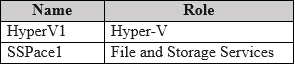
HyperV1 contains the virtual machines shown in the following table.
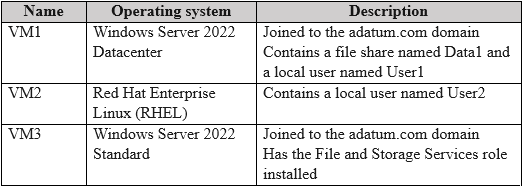
All the virtual machines on HyperV1 have only the default management tools installed.
SSPace1 contains the Storage Spaces virtual disks shown in the following table.

Azure Resources
ADatum has an Azure subscription that contains an Azure AD tenant. Azure AD Connect is configured to sync the adatum.com forest with Azure AD.
The subscription contains the virtual networks shown in the following table.
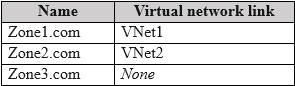
The subscription contains the Azure Private DNS zones shown in the following table.
The subscription contains the virtual machines shown in the following table.
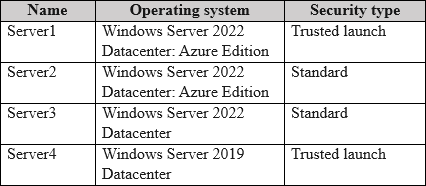
All the servers are in a workgroup.
The subscription contains a storage account named storage1 that has a file share named share1.
Requirements
Planned Changes
ADatum plans to implement the following changes:
- Sync Data1 to share1.
- Configure an Azure runbook named Task1.
- Enable Azure AD users to sign in to Server1.
- Create an Azure DNS Private Resolver that has the following configurations:
- Name: Private1
- Region: West US
- Virtual network: VNet1
- Inbound endpoint: SubnetB
- Enable users in the adatum.com domain to access the resources in the south.fabrikam.com domain.
Technical Requirements
ADatum identifies the following technical requirements:
• The data on SSPace1 must be available always.
• DC2 must become the schema master if DC1 fails.
• VM3 must be configured to enable per-folder quotas.
• Trusts must allow access to only the required resources.
• The users in the Marketing OU must have access to storage1.
• Azure Automanage must be used on all supported Azure virtual machines.
• A direct SSH session must be used to manage all the supported virtual machines on HyperV1.
You need to implement the planned changes for Azure AD users to sign in to Server1.
Which PowerShell cmdlet should you run?
- A. New-ADComputer
- B. Set-AzVM
- C. Set-AzVMExtension
- D. Add-ADComputerServiceAccount
- C. Set-AzVMExtension
The Suggested answer is correct
To enable Azure AD users to sign in to Server1 (which is in a workgroup) you need to install AADLoginForWindows extension (full name: Azure AD based Windows Login, recently renamed to: Microsoft Entra login VM)
sardonique
3 months, 1 week ago
As always the question is badly formulated. you need both B and C commands. you would need to enable System-Assigned Managed Identity anyways, which is done using the Set-AzVM cmdlet. and you need to configure the extension as well. The People behind these question are not up to the task.
upvoted 3 times
Payday123
1 year ago
Selected Answer: C
To enable Azure AD users to sign in to Server1 (which is in a workgroup) you need to install AADLoginForWindows extension (full name: Azure AD based Windows Login, recently renamed to: Microsoft Entra login VM)
upvoted 4 times
NazerRazer
1 year, 1 month ago
To implement the planned change for Azure AD users to sign in to Server1, you should run the Set-AzVMExtension PowerShell cmdlet. This cmdlet is used to configure extensions on an Azure Virtual Machine (VM). The specific extension you would configure in this case is likely the "Custom Script Extension" or similar, which would allow you to run scripts or commands on the VM to enable Azure AD users to sign in. So, the correct answer is: C. Set-AzVMExtension
upvoted 4 times