
Exam
Answer confirmed
Question
You need to sync files from an on premises server named Server1 to Azure by using Azure File Sync.
You have a cloud tiering policy that is configured for 30 percent free space and 70 days.
Volume E on Server1 is 500 GB.
A year ago, you configured E:\Data on Server1 to sync by using Azure File Sync. The files that are visible in E:\Data are shown in the following table.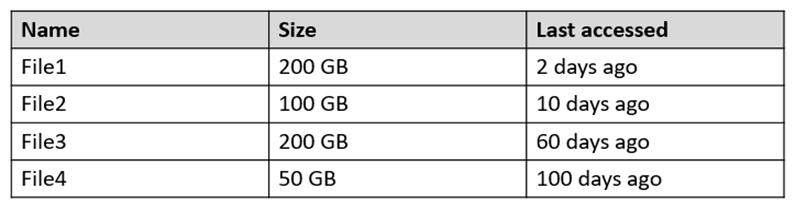
Volume E does NOT contain any other files.
Where are File1 and File3 located? To answer, select the appropriate options in the answer area.
NOTE: Each correct selection is worth one point.
Hot Area:
Proposed answer
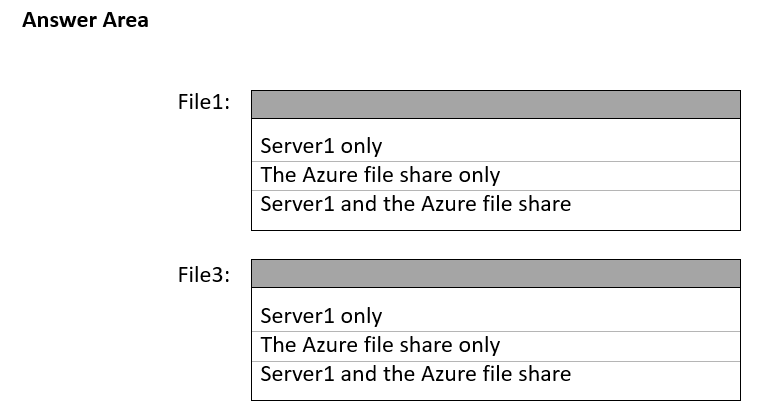
Suggested answer
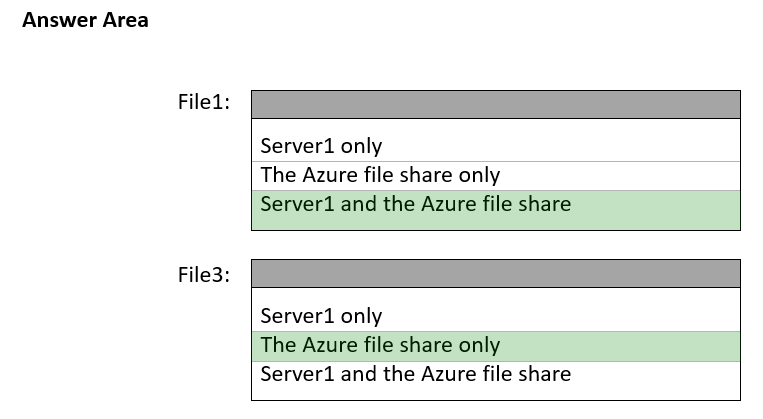
Correct answer
Suggested answer is correct
prepper666
Highly Voted 2 years, 5 months ago
Although File3 is less than 70 days old, it is replaced by File1 as the free space policy will override the date. Therefore it will be placed on cold-tier in azure FS only. File 1 which replaces file3 remains on both.
upvoted 13 times
valgaw
2 years, 4 months ago
Agree. Correc answer should be:
Explanation with samples, as nazgul250 posted below: https://docs.microsoft.com/en-us/azure/storage/file-sync/file-sync-cloud-tiering-policy
upvoted 19 times
MR_Eliot
Most Recent 1 year, 2 months ago
Provided answer is correct.
upvoted 1 times
syu31svc
1 year, 8 months ago
https://learn.microsoft.com/en-us/azure/storage/file-sync/file-sync-cloud-tiering-policy
The volume free space policy ensures that a specified percentage of the local volume the server endpoint is located on is always kept free. The date policy tiers files last accessed x days ago or later. The volume free space policy will always take precedence. When there isn't enough free space on the volume to store as many days worth of files as described by the date policy, Azure File Sync will override the date policy and continue tiering the coldest files until the volume free space percentage is met. Azure File share will always be available for all the files. 30% free space so 350GB is allowed meaning that File 3 will be in the file share only
upvoted 4 times
syu31svc
1 year, 8 months ago
In other words answer is correct
upvoted 2 times
empee1977
1 year, 10 months ago
File 1: C: Server1 and Azure file share
File 3: B: the azure file share only Azure File Sync uses a cloud tiering policy to determine which files are kept locally and which files are moved to the cloud. The policy is configured to have 30 percent free space and 70 days, meaning that files that haven't been accessed for 70 days are moved to the cloud to keep 30 percent of the disk space free. In this scenario, File1 was last accessed 2 days ago and is 200GB in size, so it will remain locally on Server1. File2 was last accessed 10 days ago and is 100GB in size, so it will remain locally on Server1. File3 was last accessed 60 days ago and is 2000GB in size, so it will be moved to the cloud and stored in the Azure file share. File4 was last accessed 100 days ago and is 50GB in size, so it will be moved to the cloud and stored in the Azure file share. Therefore, File1 is located on Server1 only and File3 is located in the Azure file share only.
upvoted 4 times
Leocan
2 years ago
70% of 500GB is 350GB. File4 is on Azure file share only because it's older than 70 days. File1 and File2 are a total of 300GB in size. File3 can have 50GB on server1. So File3 should be on Server 1 and Azure file share too.
upvoted 3 times
Leocan
2 years ago
both are the same: on Server 1 and Azure file share
upvoted 2 times
jecawi9630
1 year, 11 months ago
Won’t keep a partial file - 50 GB out of 200GB. This is a file, not a folder. File 3 will be only in Azure, and not at all on the server.
upvoted 5 times
nazgul250
2 years, 6 months ago
The volume free space policy will always take precedence; when there isn't enough free space on the volume to store as many days worth of files as described by the date policy, Azure File Sync will override the date policy and continue tiering the coldest files until the volume free space percentage is met. https://docs.microsoft.com/en-us/azure/storage/file-sync/file-sync-cloud-tiering-policy
upvoted 3 times
yayh
2 years, 6 months ago
It should be both same answer onprem File server and Azure file share Sync mean both ways then data tiering to remove cool file from onprem after 70 days
upvoted 2 times
Vmwarevirtual
2 years, 6 months ago
The volume free space policy tells Azure File Sync to tier cool files to the cloud when a certain amount of space is taken up on your local disk. With the date policy, cool files are tiered to the cloud if they haven't been accessed (that is, read or written to) for x number of days
upvoted 1 times